
1. Accessing Your Tools (The App Launcher)
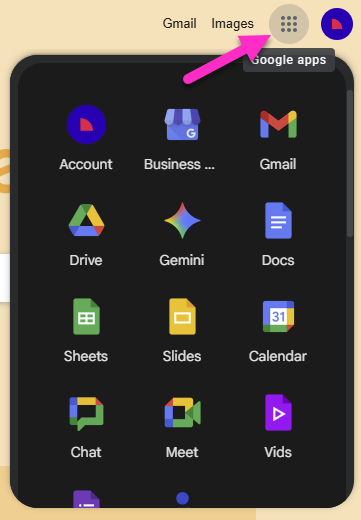
The easiest way to jump between your email, files, and other apps is by using the Google App Launcher (often called the "waffle" icon).
Once you are logged into any Google service, look at the top-right corner of your browser window.
Click the icon that looks like a 3x3 grid of dots.
A dropdown menu will open, allowing you to instantly switch between Gmail, Drive, Calendar, and more.
2. Setting Up Your Primary Apps
Here is how to access and get started with the core tools you will use every day.
Gmail (Your Barry Plant Email)
Your email is where you will receive property inquiries, internal network updates, and client communications.
How to access: Go to gmail.com or click Mail in the App Launcher.
Log In: Use your full corporate email address (e.g.,
jdoe@barryplant.com.au) and the temporary password provided by IT. You will be prompted to create a secure password on your first login.
Please note: email signatures are automatically populated from Barry Plant HQ for each office and they pull in information about you, including your title from your Google Workspace profile.
Google Drive (File Storage & Sharing)
Drive is where we store our listing presentations, marketing templates, property folders, and team documents.
How to access: Go to drive.google.com or click Drive in the App Launcher.
Shared Drives: On the left-hand menu, you will see a section called Shared Drives. This is where your specific office and the broader Barry Plant network store shared assets, logos, and training materials. Never store team-wide property files in your personal "My Drive"—always use your office's designated Shared Drive.
Google Calendar (Bookings / Appointments & Online Meetings)
How to access: Go to calendar.google.com or click Calendar in the App Launcher.
Sharing: By default, your calendar is visible to your office team so they can see when you are out on appraisals or inspections.
Mobile Apps
Download the Gmail, Google Drive, and Google Calendar apps from the App Store or Google Play Store. Log in using your Barry Plant credentials so you can access information right from your phone while out and about.